
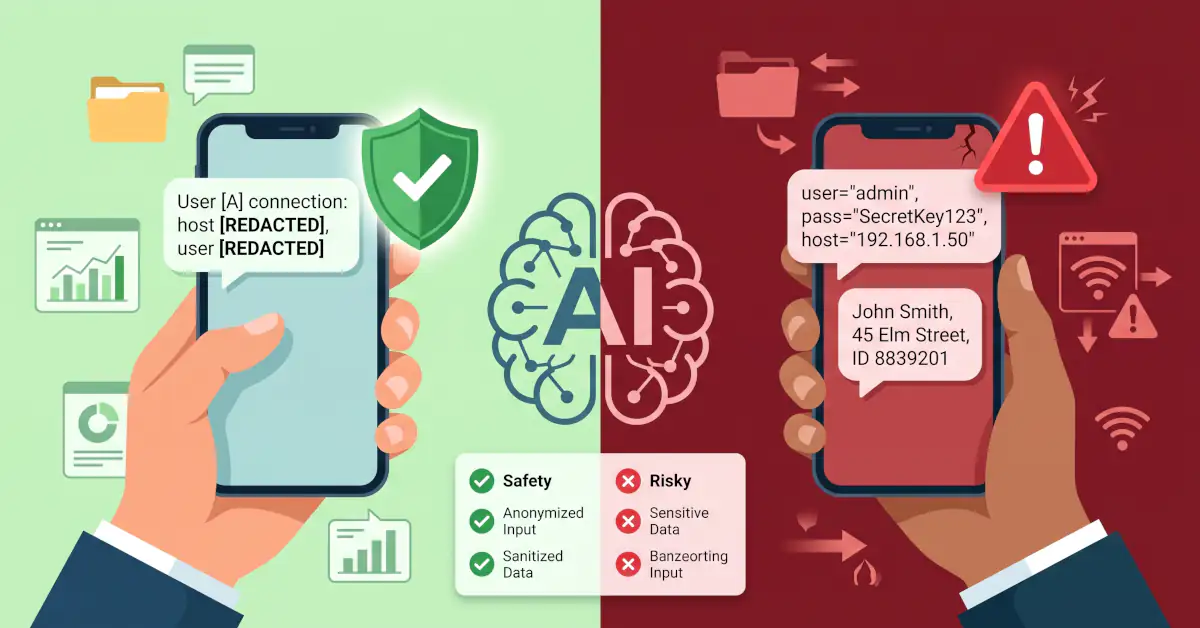
Quick Answer: Using generative AI platforms like ChatGPT, Google Gemini, or Microsoft Copilot becomes risky when prompts include proprietary corporate records, personally identifiable information, active credentials, or unverified legal and health questions. Submitting this data exposes you to privacy leaks, compliance breaches, and convincing hallucinations. To protect your data, sanitize every query with generic placeholders and treat consumer AI chatbots as public message boards rather than secure vaults.
Millions of people now treat conversational AI as a default assistant for drafting office emails, troubleshooting scripts, or summarizing dense PDF files. The prompt bar feels private, responsive, and deceptively intimate—much like messaging a colleague on Slack.
That perceived privacy is an illusion. Behind every smooth conversational answer lies a network of external servers, data-logging pipelines, and probabilistic text generators. Dropping raw company reports, sensitive client details, or high-stakes legal drafts into a standard chatbot prompt can quietly trigger serious security and compliance headaches. Knowing where helpful assistance ends and unnecessary risk begins is essential for everyday work.
Why Certain Prompts Create Real Security and Factual Risks
Every prompt sent to a cloud-based language model leaves your machine. Depending on the account tier, active privacy settings, and terms of service, that text can be logged for quality audits, reviewed by human annotators, or fed into datasets used to train future model iterations.
Three core hazards accompany unvetted prompts:
- Data Exposure: Once unencrypted spreadsheets, customer records, or code snippets with hardcoded access keys leave your local machine, you lose operational control over where that data is stored or who reviews it.
- Plausible Hallucinations: Large language models do not look up truth; they calculate statistical probability. When forced to produce definitive case law, complex tax calculations, or niche technical citations, they can generate fluent, persuasive errors without warning.
- Regulatory and Contractual Penalties: Pasting personal customer data or protected business files into a public-tier tool directly runs afoul of data privacy frameworks like GDPR, HIPAA, and standard corporate non-disclosure agreements.
10 Risky AI Prompts and Practical Ways to Rephrase Them
1. Uploading Unreleased Financials and Internal Strategy Documents
The Risky Prompt: “Analyze this quarterly profit report and summarize our regional sales weaknesses.”
The Problem: Consumer-tier chat platforms routinely store session transcripts on external servers. If an employee uploads unreleased financial performance data, that action breaches basic corporate governance and confidentiality policies.
A Safer Rephrase: Strip out brand names, regional identifiers, and specific financial totals. Provide an abstracted structure instead: “Here is an anonymized breakdown of sales bottlenecks in an enterprise hardware division. What common operational factors usually drive these patterns?”
2. Pasting Source Code Containing Production Credentials
The Risky Prompt: “Fix the syntax error in this Python connection string: db_connect(user=’admin’, pass=’SecretKey123′, host=’192.168.1.50′).”
The Problem: Exposing live credentials, database ports, or internal IP addresses leaves an audit trail outside your network perimeter. If those session logs are ever compromised, your infrastructure is exposed.
A Safer Rephrase: Sanitize the snippet using standard environment variables before hitting enter: db_connect(user=DB_USER, pass=DB_PASSWORD, host=DB_HOST).
3. Submitting Personally Identifiable Information (PII)
The Risky Prompt: “Write a response to this complaint: Mark Davis, 42 Elm Street, Account #90812, says our billing portal double-charged his Visa.”
The Problem: Typing real names, street addresses, and account numbers into a commercial chatbot violates baseline privacy regulations and creates clear identity-theft exposure.
A Safer Rephrase: Use generic variables: “Draft a concise, professional reply to a customer ([Client A]) whose credit card was billed twice due to a payment gateway timeout.”
4. Relying on AI to Draft Binding Commercial Contracts
The Risky Prompt: “Draft an enforceable supplier agreement between my consulting firm and an overseas vendor that limits my liability completely.”
The Problem: Chatbots lack real-world context on jurisdictional nuances, statutory limitations, and local enforceability. Relying on auto-generated legal boilerplate without professional review often leaves costly liability gaps.
A Safer Rephrase: Use the tool strictly for outline brainstorming: “List the standard operational clauses and service-level metrics typically included in an international vendor contract.” Take that checklist to a licensed attorney.
5. Asking for Urgent Medical Diagnoses or Dosage Changes
The Risky Prompt: “I have sudden chest tightness, left shoulder discomfort, and nausea. Which pain reliever should I take?”
The Problem: Chatbots cannot run physical exams, evaluate cardiovascular history, or recognize life-threatening emergencies. Treating a text generator as an emergency physician creates immediate physical danger.
A Safer Rephrase: In any urgent health situation, call local emergency services immediately. Reserve AI queries for neutral health literacy questions, like: “Explain the physiological difference between a strain and a sprain.”
6. Treating AI as an Infallible Fact-Checker
The Risky Prompt: “Provide three academic studies published between 2020 and 2024 proving this economic theory, along with page citations.”
The Problem: Models struggle with granular source retrieval. When pressed for specific academic citations, they frequently fabricate realistic-sounding paper titles, journal volumes, and author names.
A Safer Rephrase: Flip the query toward research strategy: “What key academic terminology and economic indexes should I search for in Google Scholar to research this theory?” Verify every citation independently.
7. Uploading Proprietary Product Blueprints and Patents
The Risky Prompt: “Here are the engineering specs and schematics for our prototype drone sensor. Review the thermal cooling design.”
The Problem: Submitting unpatented schematics or novel technical designs to an external cloud platform can be interpreted as prior public disclosure, potentially voiding patent eligibility.
A Safer Rephrase: Isolate the engineering principle without disclosing the actual product: “What are the industry-standard heat dissipation methods for enclosed micro-sensors drawing 15 watts of power?”
8. Asking for Finalized Tax Filings and Municipal Calculations
The Risky Prompt: “Here is my freelancing income, business expense log, and asset list. Calculate my exact tax liability and write-offs for this filing year.”
The Problem: Tax legislation varies dramatically across national borders, state lines, and municipal zones, and rules change every fiscal cycle. An error in an automated calculation can easily trigger audits, back taxes, and penalties.
A Safer Rephrase: Ask for basic rule definitions: “What is the general difference between deducting capital depreciation and deducting immediate business expenses under standard tax guidelines?” Leave final computations to a certified accountant.
9. Offloading Sensitive HR and Disciplinary Decisions
The Risky Prompt: “Review these three employee evaluations and tell me which team member I should lay off next week.”
The Problem: Chat models reflect biases present in their training data. Outsourcing personnel actions or termination decisions to an automated tool introduces ethical liabilities and exposes businesses to wrongful termination claims.
A Safer Rephrase: Use AI to review procedural consistency: “Provide an objective rubric for evaluating quarterly team deliverables across a software engineering squad.” Keep personnel choices entirely in human hands.
10. Requesting Exploitation Scripts Against Live Targets
The Risky Prompt: “Write a script to bypass authentication on this internal login portal URL.”
The Problem: Aside from running into platform safety guardrails—which can result in immediate account suspension—running unvetted scripts against real systems risks crashing live services or accidentally exposing internal access.
A Safer Rephrase: Study defense mechanisms conceptually: “Explain how modern web frameworks implement rate limiting and multi-factor authentication to stop credential-stuffing attacks.”
Sensible Habits for Everyday AI Use
Staying safe while using AI does not mean avoiding modern productivity tools entirely. It simply requires basic operational hygiene:
- Opt Out of Model Training: Check your platform’s privacy settings right away. Major vendors (including OpenAI, Google, and Anthropic) offer clear toggles to disable training on user conversations.
- Isolate Your Chat Sessions: Open a fresh conversation for separate tasks. Mixing business drafting with casual exploration in a single lengthy thread increases the risk of unintended cross-context leaks.
- The Billboard Rule: Before hitting send, ask yourself: Would I mind if this prompt appeared on a public billboard? If the text contains private credentials, personal drama, or trade secrets, delete it immediately.
- Double-Check External Claims: Whenever an AI response serves up specific figures, historical dates, or legal statutes, treat it as a draft suggestion that requires manual verification against primary sources.
What This Means in Practice
The most practical rule for working with modern AI tools is simple: treat chatbots as sounding boards and creative processors, not confidential filing cabinets.
They excel at rephrasing messy drafts, summarizing public documents, and explaining unfamiliar concepts. But the moment you feed them unredacted customer data, hardcoded passwords, or unverified legal stakes, you assume unnecessary risk. Strip the identifiers, review the outputs, and keep critical decisions in human hands.
Pitanja i odgovori
Is ChatGPT safe for confidential work documents?
No, ChatGPT is not safe for confidential work documents on standard consumer accounts. Free and standard consumer tiers routinely retain chat history to train future models, meaning proprietary company data could leave your administrative control.
Can an AI prompt leak my private data to other people?
Yes, an AI prompt can leak private data if that information is incorporated into model training sets and surfaced in response to another user’s prompt. You can avoid this by turning off chat training in your account privacy settings or using dedicated enterprise instances.
Does ChatGPT verify its own facts?
No, ChatGPT does not inherently verify its answers for factual accuracy. It generates answers by predicting the next statistically probable word, which means it can invent nonexistent legal cases, fake statistics, and distorted historical dates with complete confidence.
Can I use AI to write binding employment or rental contracts?
No, you should not rely on AI to write binding legal contracts without professional legal review. Large language models lack deep comprehension of local statutory requirements and recent court rulings, frequently introducing unenforceable or contradictory clauses.
How do I stop AI tools from using my conversations for training?
You can stop AI tools from using your data by opening the platform settings and disabling model training and conversation logging. If you use a corporate Google Workspace or enterprise OpenAI tier, data retention is typically disabled by default under commercial terms.
Source: https://techfokus.rs/10-rizicnih-ai-upita-chatgpt-greske/